
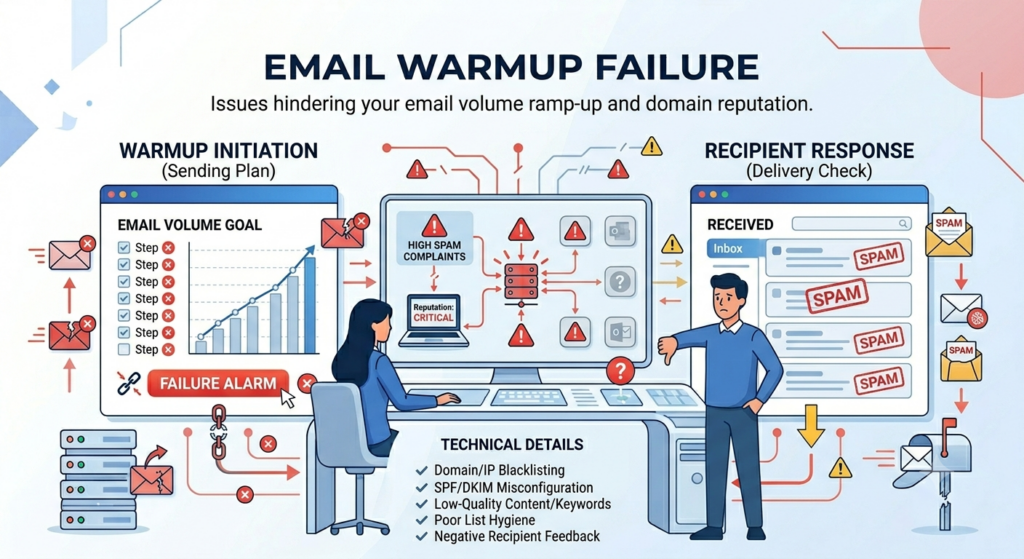
Email Warmup Failure is one of the most common yet overlooked causes of declining email performance. Your campaigns are running. Emails are going out. Open rates look normal.
But over the last three weeks, reply rates have dropped 40%. No error in the dashboard. No alert. No explanation.
That is what Email Warmup Failure looks like most of the time. Not a crash. A slow bleed.
Most warmup problems do not announce themselves. There is no banner, no notification that your mailbox has been ejected from the warmup pool. Your campaigns keep running. Your dashboard still shows the account as active. And the whole time, your sender reputation is quietly degrading with every email that goes out.
By the time the numbers look wrong, you are already weeks behind where you should be.
This post breaks down what warmup failure actually looks like under the hood, why it happens, and the specific signals you can check before the damage becomes a deliverability crisis. Understanding Email Warmup Failure early can help you protect your sender reputation, maintain inbox placement, and prevent long-term deliverability issues.
TLDR
What Email Warmup Is Actually Doing
Before you can catch warmup failure early, it helps to understand what warmup is doing in the first place.
When you add a mailbox to Smartlead and enable warmup, that mailbox joins a shared pool alongside other verified mailboxes. Smartlead’s system then automatically sends warmup emails between mailboxes in the pool, simulating the kind of real human engagement that inbox providers use to assess sender reputation. This includes opening emails, saving them from spam, replying, and marking them as important.
To keep warmup emails from being flagged as automated, each mailbox is assigned a unique two-word identifier injected directly into the warmup email body. The email reads like a normal human message rather than a template, and it gives you a clean way to filter warmup emails without accidentally deleting them.
None of that works if the mailbox gets removed from the pool. Understanding why that happens is where early detection starts.
Why Warmup Gets Disabled Without Warning
There are several ways a mailbox can be ejected from the warmup pool, and almost none of them come with a real-time notification.
Smartlead validates every address in the warmup pool every six hours. If a mailbox fails that check, it goes through a slower try-catch verification. If it fails that, it goes through a six-step SMTP check. Any mailbox that cannot clear those gates gets removed from the pool automatically.
The reasons a mailbox might fail those checks often have nothing to do with the mailbox itself being broken.
A credit card expiring and causing the account to stop accepting mail. MX records changing or lapsing. A DMARC policy that rejects emails from third-party senders. An inbox that is full.
Filters that block emails containing certain words. A temporary clog on the ESP side that queues rather than delivers.
In any of these cases, Smartlead sees a bounce, removes the mailbox from the pool, and places it in a cool-off period. After four hours, the system sends a test email to see if the mailbox is accepting again.
If it is, the mailbox is added back with no damage done. If it is still not accepting emails, the mailbox stays off the pool until you manually verify it is sending and receiving correctly and contact support with proof.
The problem is that none of this surfaces in real time. You might not discover the ejection until warmup stats go flat or deliverability on a live campaign starts dropping.
Why Warmup Failure Is Hard to See
Most deliverability problems give you a clear signal. A failed OAuth token throws an error in your mailbox settings. A disconnected account shows as inactive. A hard bounce spike is visible in campaign stats the same day.
Warmup failure works differently. It degrades gradually, and the metrics most teams watch daily are the last ones to reflect it.
Receiving servers start routing emails to the promotions tab or filtering them before your tracked open rate drops noticeably. And reply rate, the number that actually matters, is the last indicator to move. By the time your reply rate falls off, the warmup problem causing it has often been present for two to three weeks already.
That delay is where most teams lose pipeline. They see the reply rate drop, assume it is a copy problem or an ICP problem, and spend weeks testing new sequences on infrastructure that is already compromised.
The Four Most Common Silent Failure Patterns
Warmup Emails Are Being Received But Not Sent
This is one of the most confusing patterns because the dashboard looks active. Emails are coming in. The account appears to be in the pool. But when you look at the sent count, it is zero or near zero.
This usually means the mailbox is still in the pool for receiving purposes but something is preventing outbound sends. Check whether the SMTP connection is live, whether daily sending limits have been reached, and whether the account has hit any ESP-level restrictions on outbound volume.
The Sent and Received Counts Are Wildly Mismatched
If you are seeing significantly more emails received than sent, this used to be a reporting issue in Smartlead. The platform previously counted every recipient of a warmup email as a received email, not just actual replies. That logic has since been corrected, so received emails should now track more closely with actual replies.
If you are still seeing a large mismatch after that update, check whether your reply rate settings are misconfigured. A reply rate above 30% is not recommended unless you have a specific reason for it. An unnaturally high reply rate can trigger spam signals just as much as a low one.
Warmup Stats Go Flat With No Explanation
You check your warmup stats and the numbers stop moving entirely. No emails sent. No emails received. No engagement. The account looks active in your Email Accounts tab but warmup activity has dropped to zero.
This is the classic sign of a cool-off period that never resolved. The mailbox bounced, got removed from the pool, failed the four-hour recheck, and has been sitting off the pool ever since. The fix requires manually verifying that the mailbox can both send and receive emails, then contacting Smartlead support with proof of both before the account can be re-added.
Warmup Is Running But Deliverability Is Not Improving
This is the subtlest pattern and the hardest one to catch. The warmup looks fine on paper, emails are going out, engagement looks normal, but live campaigns are still hitting spam. Open rates are low, reply rates are flat, and new domains are not building the reputation you expected.
This usually points to a pool quality problem rather than a configuration problem. Your warmup pool tier determines the quality of warmup interactions your mailbox receives. Foundation Pool mailboxes get a different quality of warmup than Premium or Ultra Premium Pool mailboxes. If your mailbox is on a lower pool tier than your sending volume requires, the warmup will technically be running while not actually moving the needle on reputation.
The Five Signals of Silent Warmup Failure
1. Reply rate falls while open rate holds steady.
This is the clearest early signal. If your open rate is stable but replies have stopped, the problem is not your copy and it is not your targeting.
Something changed in where your emails are actually landing inside the recipient’s inbox.
Emails opened in the promotions tab do not convert the same way as primary inbox placements.
2. Your warmup network response rate is declining.
Warmup works because a pool of inboxes is exchanging emails with your mailbox, opening them, and marking them as important.
Most warmup platforms show a warmup health score or response rate from that network. If that rate starts declining, your mailbox reputation is already degrading inside the pool. It will show up in campaign data later, not immediately. Catching it here is catching it early.
3. Bounce categories are shifting from hard to soft.
A hard bounce means the email address does not exist. A soft bounce means the receiving server temporarily rejected the email, often because it is being deferred.
A steady hard bounce rate is normal and manageable. The same rate shifting increasingly toward soft bounces is a different problem. It often means receiving servers are starting to defer your emails rather than accept them. That is an early inbox placement warning.
4. Inbox placement rate is below 85%.
A healthy mailbox should land in the primary inbox more than 85% of the time. Below 85% means your emails are reaching promotions or getting filtered for at least one in seven recipients.
Below 70%, the mailbox is in real trouble and running active sequences on it is making things worse. Read more on healthy inbox placement benchmarks.
Clicking that opens the full pool status view, which shows your current pool level, your progress toward the next tier, your overall pool score out of 100, and exactly which criteria are holding you back.
Pool eligibility is calculated across six factors: account age, authentication hygiene (SPF, DKIM, DMARC), bounce rate, sending volume, reply rate, and ESP diversity. Each factor shows your current value against the required benchmark, so you can see specifically what needs to improve.
The pool tiers are Foundation, Growth, Premium, and Ultra Premium. Ultra Premium is available to qualifying Pro and Unlimited Smart plan users and is currently free for all qualified mailboxes. Being on an eligible plan does not automatically grant access. You still need to meet all criteria shown in the pool status view and complete the upgrade flow.
Checking this view once a week takes about ninety seconds and tells you more about your actual warmup health than any single metric in your campaign dashboard.
How to Catch It Before It Costs Pipeline
Keep warmup health separate from campaign health in your weekly review.
Most teams check one place: the campaign dashboard. Warmup health is a different signal. Smartlead surfaces mailbox health independently from campaign analytics. A declining warmup score or inbox placement rate in that view tells you something is wrong before it shows up in your campaign reply rate.
Set a baseline inbox placement rate and monitor it weekly.
When a mailbox is healthy, note the inbox placement rate. That number becomes your baseline. When it starts dropping toward 90%, investigate before increasing volume.
Watch bounce categories, not just bounce volume.
Total bounce rate is a useful metric. Bounce category breakdown is more useful. A bounce rate that is stable in volume but shifting from hard to soft bounces is telling you something the top-line number will not.
Do not run active sequences and warmup simultaneously in the first two weeks.
This is the most common mistake among teams that are genuinely trying to warm up correctly. They start warmup, see the score climbing, and launch sequences before the warmup period is complete. For new mailboxes, wait until warmup is complete and inbox placement is stable before starting sequences. The recommended warmup timeline is two to four weeks minimum.
Run infrastructure diagnostics before changing copy.
If your reply rate has dropped, start with infrastructure. Running diagnostics will tell you whether the problem is warmup health, mailbox connectivity, bounce thresholds, or something else entirely. Changing copy first when infrastructure is compromised wastes two to three weeks of effort.
The Outlook Problem That Warmup Alone Cannot Fix
One failure pattern worth separating out is Outlook-specific SMTP rejections. These are 550 5.7.x error codes that Microsoft returns when a sending domain or IP is blocked, and they interact with warmup in a way that is not always obvious.
A 550 5.7.708 error means Outlook is blocking traffic from that tenant because of low reputation or a trial license. A 550 5.7.501 means the domain itself is banned or blacklisted. A 550 5.7.750 means Outlook has identified bulk or spam-like behavior from the domain.
In all of these cases, warmup cannot fix the problem on its own. The mailbox needs to be paused from live sending, the underlying domain or IP issue needs to be resolved, and then warmup needs to rebuild the domain’s reputation at a reduced volume before live campaigns resume.
Running warmup through a domain that is actively returning 550 errors does not help. It compounds the damage because the warmup activity itself is being rejected, generating more bounce signals, which makes the reputation problem worse. Check the specific error code first. Each 550 5.7.x code points to a different root cause. Without knowing the code, you are guessing at the fix.
Recovery Timeline
If caught early (within the first two to three weeks of decline):Pause active sequences on the affected mailbox. Keep warmup running at 10 to 20 emails per day. Do not increase volume until inbox placement stabilizes above 85%. Expect 14 to 21 days to reach reliable inbox placement again.
If caught late (after reply rates have already collapsed significantly):Same steps, with a longer recovery window of 21 to 30 days. If the mailbox domain has been sending at high volume for weeks with degraded placement, consider retiring it and starting fresh on a new domain. Domains that are repeatedly pushed into damage take longer to recover with each cycle.
The difference between early and late detection is roughly two weeks of recovery time and the domain’s long-term sending reputation.