
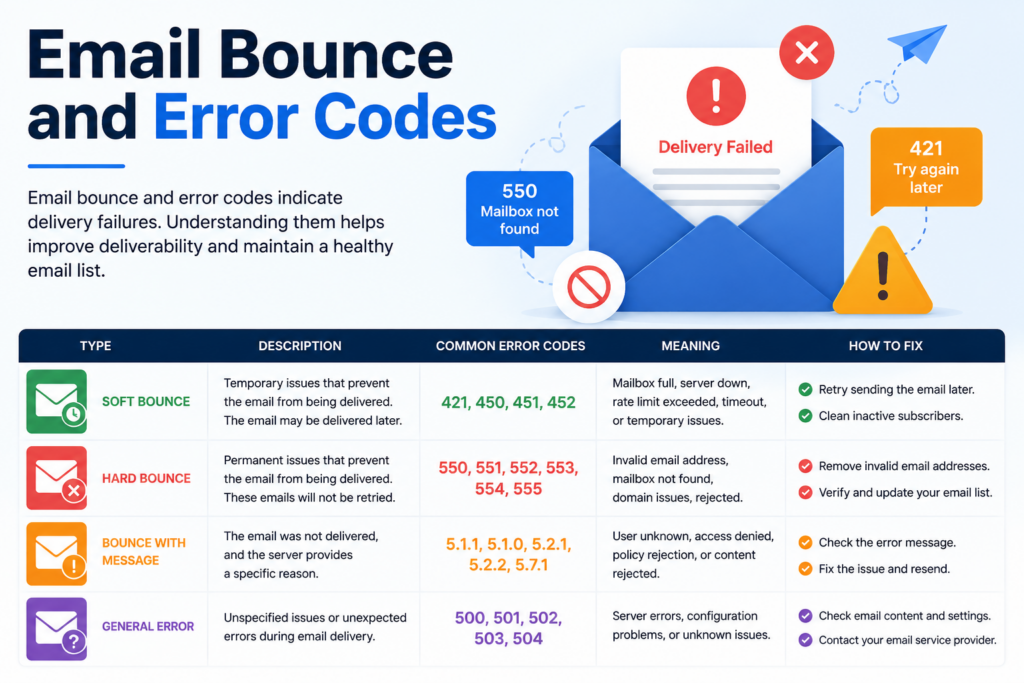
Experiencing a bounced-back email can be frustrating for marketers, especially those who depend on cold or bulk email campaigns to connect with potential customers. Understanding Email Bounce and Error Codes is essential for identifying why emails fail to deliver and how to fix these issues effectively. By learning the causes behind delivery failures, businesses can improve email performance and increase the success rate of their marketing campaigns.
In this guide, we’ll explore the most common Email Bounce and Error Codes and provide practical solutions to troubleshoot them efficiently. Whether you are facing soft bounces, hard bounces, or SMTP server issues, understanding Email Bounce and Error Codes can help optimize your email outreach strategy. By the end, you’ll have the tools and knowledge needed to improve email deliverability and ensure your messages successfully reach your recipients’ inboxes.
What Are Email Bounce Codes?
Email bounce is well-known challenge that many marketers encounter. A bounce back occurs when an email returns to its sender instead of reaching its intended recipient. When an email bounces, it includes bounce codes that indicate whether it is a soft bounce (a temporary problem) or a hard bounce (a permanent problem). (See the screenshot below. The blue highlighted is the error code)

The codes also help email administrators understand the specific reason why the bounce occurred. Problems can range from the email address being invalid or not available to a full inbox problem or a server down issue.
A high bounce rate can negatively affect your email deliverability and sender reputation. Before we look at some ways to fix this issue, let’s dig deeper into the types of bounce codes or errors, as well as, understand traditional and enhanced error codes.
Soft Bounce Vs. Hard Bounce
Soft bounces are temporary problems that affect the email’s deliverability. It can be due to common problems like a full inbox or an error in the email address. Examples include:
- Temporary Server Issue: This occurs when the recipient’s email server experiences temporary unavailability or technical difficulties. Although the email cannot be delivered immediately, it may be retried later once the server becomes accessible again.
- Full Mailbox: When a recipient’s mailbox reaches its storage capacity and is unable to receive additional messages, incoming emails bounce back to the sender. This bounce indicates that the recipient needs to clear space in their mailbox to resume receiving new emails.
- Content Filtering: Certain email servers employ stringent content filters to identify and flag emails containing potential spam or harmful content. If your email triggers these filters, it may bounce back to the sender, indicating that the content needs to be adjusted to comply with the server’s filtering criteria.
- Greylisting: Greylisting is a proactive spam prevention technique wherein the recipient’s email server temporarily rejects emails from unknown senders. While initially bounced back, legitimate emails are typically retried later and eventually delivered to the recipient’s inbox after being recognized as non-spam.
A hard bounce indicates a more serious problem and requires a little more effort to be fixed. For example, even if you send to the right email address, but the recipient’s mailbox no longer exists, then it can be counted as a hard bounce. It is difficult to fix hard bounce errors. Types of hard bounces can be:
- Invalid Email Address: A hard bounce occurs when the email address provided by the sender is invalid, non-existent, or contains typographical errors. This bounce is permanent and indicates that the email cannot be delivered to the intended recipient due to an incorrect or outdated email address.
- Blocked Domain: If the sender’s domain or IP address has been blacklisted by the recipient’s email server or spam filter, emails originating from that domain will bounce back as hard bounces. This bounce is permanent and indicates that the sender’s domain is prohibited from delivering emails to the recipient’s server.
- Mailbox Does Not Exist: Similar to an invalid email address, this bounce occurs when the recipient’s email account has been deleted, deactivated, or no longer exists. As a result, emails sent to that address will bounce back as undeliverable, indicating that the recipient’s mailbox cannot be reached.
- SMTP Authentication Failure: This bounce occurs when the sender’s email server fails to authenticate with the recipient’s email server during the delivery process. Such authentication failures may result from misconfigurations or security-related issues, preventing the email from being successfully delivered to the recipient’s inbox.
When it comes to email marketing campaigns, soft bounces can be easily fixed by identifying the problem and then re-attempting to send the email. Hard bounces are more difficult to fix, and you should generally avoid resending emails that are hard bounced.
Understanding Email Bounce Codes – Traditional Vs Enhanced SMTP Codes
Traditional SMTP Bounce Codes
Traditional SMTP codes provide basic-level information about a bounce. They are generally three-digit codes that indicate whether an email was delivered or not. If undelivered, they also indicate the exact reason for undeliverability. For example, a code 550 indicates that the mailbox is unavailable. A 501 error shows that the user is unknown. Most codes starting from ‘4’ indicate a soft bounce, for example, 421, while those starting from ‘5’, like 501, indicate a hard bounce.
List of Traditional Bounce Code
Remember that the codes starting from ‘4’ are generally considered as soft bounce, while the ones starting from ‘5’ are generally considered hard bounce.
- 420 – Network congestion or server issue
- 421 – Receiving server temporarily unavailable
- 422 – Recipient’s mailbox is full
- 431 -Receiving server encountered an error
- 432 – Recipient server is not accepting messages at the moment
- 441 – Recipient’s server is not responding
- 442 – Connection was dropped
- 446 – Maximum hop count was exceeded (internal loop)
- 447 – Outgoing message timed out in the incoming server
- 449 – A routing error occurred
- 450 – Mailbox unavailable
- 451 – Local processing error temporarily
- 452 – Recipient’s mailbox full temporarily
- 471 – Temporary error in the local server (additional information provided)
- 500 – Syntax error (command not recognized)
- 501 – Syntax error in parameters or command arguments
- 502 – The command is not implemented
- 503 – Bad sequence of commands
- 504 – Command parameter not implemented
- 510/511 – Bad email address; check the address
- 512 – DNS error; domain could not be found
- 515 – Destination mailbox address invalid
- 517 – Problem with the sender’s mail attribute
- 521 – Domain is not accepting mail
- 523 – Server limit exceeded; message too large
- 530 – Access denied; authentication required
- 531 – Mail system full
- 541 – No response from host (might be due to anti-spam filter)
- 550 – Mailbox unavailable/Not found
- 551 – User not local; please try forwarding
- 552 -Exceeded storage allocation
- 553 – Mailbox name is invalid
- 554 – Transaction failed; recipient server suspects spam or your IP is blacklisted
Enhanced SMTP Bounce Codes
Enhanced SMTP bounce codes, also known as Extended or Enhanced Mail System Status Codes, provide more detailed and standardized information about email delivery failures compared to traditional SMTP bounce codes.
They offer greater granularity and specificity, allowing senders and administrators to more accurately pinpoint the exact reason for delivery failure.
Enhanced codes are typically presented in a three-digit format followed by a decimal point and two more digits, along with a brief human-readable description.
Here’s an example of an Enhanced SMTP bounce code and its interpretation:
5.1.1 – Bad destination mailbox address
The first digit ‘5’ indicates a permanent failure, while the second digit ‘1’ indicates a general addressing failure. The third digit, ‘1,’ provides further granularity, specifying that the failure is due to a bad destination mailbox address.
Enhanced SMTP bounce codes cover a wide range of potential delivery failure scenarios, providing more detailed insights into issues such as invalid addresses, mailbox full errors, domain issues, and policy rejections, among others.
List of Enhanced SMTP Bounce Codes
- 4.2.2 – The email account is over quota
- 5.0.0 – Syntax error: invalid email address format
- 5.1.0 – Bad destination mailbox address
- 5.1.1 – Bad destination mailbox address
- 5.1.2 – Bad destination system address
- 5.1.3 – Bad destination mailbox address syntax
- 5.1.4 – Destination mailbox address ambiguous
- 5.1.5 – Destination mailbox address valid
- 5.1.6 – Mailbox has moved
- 5.1.7 – Bad sender’s mailbox address syntax
- 5.1.8 -Bad sender’s system address
- 5.1.9 – Message relayed to non-existent domain
- 5.2.0 -Other or undefined mailbox status
- 5.2.1 – Mailbox disabled, not accepting messages
- 5.2.2 – Recipient’s mailbox is full and cannot accept new messages
- 5.2.3 – Message length exceeds administrative limit
- 5.2.4 – Mailing list expansion problem
- 5.3.0 – Other or undefined mail system status
- 5.3.2 – System not accepting network messages
- 5.3.3 – System not capable of selected features
- 5.3.4 – Message too big for system
- 5.3.5 – Recipient’s mail system is misconfigured
- 5.4.0 – Other or undefined network or routing status
- 5.4.1 – Recipient’s mail server did not respond
- 5.4.2 – Problem with the connection to the recipient’s mail server
- 5.4.3 – Routing server encountered an error while delivering the message
- 5.4.4 – Message cannot be routed to the recipient’s mail server
- 5.4.5 – Network congestion is preventing delivery of the message
- 5.4.6 – Routing loop detected while delivering the message
- 5.4.7 – Message delivery time expired
- 5.5.0 – Other or undefined protocol status
- 5.5.1 – SMTP command issued by the sender is invalid
- 5.5.2 – SMTP command syntax is incorrect
- 5.5.3 – Recipient count exceeds the maximum allowed by the recipient’s mail system
- 5.5.4 – Arguments provided with the SMTP command are invalid
- 5.5.5 – SMTP protocol version used by the sender is not supported
- 5.6.0 – Other or undefined media error
- 5.6.1 – Recipient’s mail system doesn’t support the media type used by the sender.
- 5.6.2– Conversion between media types is required but prohibited.
- 5.6.3 – Conversion between media types is required but not supported
- 5.6.4 – Conversion with loss performed
- 5.6.5 – Conversion between media types failed
- 5.7.0 – Other or undefined security status
- 5.7.1 – Delivery not authorized, message refused
- 5.7.2 – Mailing list expansion prohibited
- 5.7.3 – Security conversion required but not possible
- 5.7.4 – Security features not supported
- 5.7.5 – Cryptographic operations performed by the sender failed
- 5.7.6 -Cryptographic algorithm not supported
- 5.7.7 – Message integrity failure
Important Note: Mail server administrators have the ability to customize the messages that accompany bounce codes, and it’s important to note that not all mail servers follow the same standards.
What Causes Email Bounce?
The most common reasons behind bounces are permanent or temporary issues with the email account, the sender’s server, or the receiver’s server.
Here are some reasons for bounce back:
- Invalid address: Bounces occur due to human error in typing email addresses or sending to non-existent addresses.
- Spam filter blacklisting: If your domain gets blacklisted, sending from that server is disabled permanently, impacting your sender reputation. Blocklists are regularly updated by ISPs and search engines.
- Relevant content: Sending relevant messages is crucial to avoid spam folders; irrelevant bulk emails can trigger filters.
- DNS Failure: Server-side issues with your domain records can lead to email bounces; a well-configured domain ensures smooth delivery.
- Undeliverable emails: Recipient server issues or unavailability can cause occasional bounces; frequent issues may indicate domain problems.
- Large attachments: Exceeding server limits with large attachments triggers blocks from recipient servers.
Why Is It Important To Fix Email Bounce Issue?
The bounce rate is why you should correct your mailing issues as soon as possible. An email bounce rate represents the number of outreach copies queued that do not reach their destination.
It indicates how successfully your cold outreach campaigns are being sent out and whether any changes need to be made to keep up with demand. The bounce rate plays a major role in campaign success and conversion rate.
Additionally, the sooner a bounce back can be resolved, the less likely it will affect your campaigns. Although bounce-back messages can be intimidating, avoiding them helps improve the bounce rate and campaign success. It’s time to discuss how you can overcome bounced back issues and achieve maximum conversion from your campaigns.
How to Fix Email Bounce Backs?
The best way to fix email bounce issues is to identify the underlying problem and then take effective measures to overcome it. Again, precaution is better than cure – so you should take into consideration basic email hygiene to ensure that your emails do not face any bounce issues that are out of your direct control. Below we have discussed some steps to improve your email bounce rate and avoid spam:
1. Verify the Email List Details
Verifying email addresses is essential to ensure the accuracy and effectiveness of your email marketing campaigns. By regularly verifying email addresses, you can identify and remove invalid or outdated contacts, reducing the risk of emails bouncing back and improving overall deliverability.
2. Try Double Opt-in
Implementing a double opt-in process is highly recommended to minimize email bounces. This involves asking users to confirm their contact details twice: once on the signup page and again after clicking the submit button. By requiring this confirmation, you ensure that users are fully aware of the subscription process and that their email address is genuine, reducing the likelihood of bounces caused by invalid or fake addresses.
3. Use Double Opt-out
Another effective strategy to prevent email bounces is to utilize the double opt-out method. In this approach, users must click on the unsubscribe link to stop receiving further communication. By providing a straightforward opt-out process, you empower users to easily manage their subscription preferences, thereby reducing the risk of emails bouncing back due to disinterested recipients or spam complaints.
4. Optimize Content
Enhancing your email content is crucial for reducing bounce rates and increasing engagement. Include relevant links within the email body and ensure that the subject line is concise, clear, and informative to encourage recipients to open your email. Additionally, incorporating images or videos in the content copy can make your message more visually appealing and easier for recipients to consume, ultimately reducing the likelihood of emails bouncing back.
5. Send to the Right Recipient
When experiencing email bounces, it’s essential to verify whether the message was sent to the correct recipient. If the bounce occurred due to an incorrect recipient name or address, resend the message with the corrected details to ensure it reaches the intended recipient. By confirming recipient details, you can minimize bounce rates and improve overall email deliverability.
6. Send the Cold Messages at the Right Time
Timing plays a crucial role in email campaign success and bounce rate reduction. Avoid sending emails too early or late, and instead, schedule them for optimal times based on industry statistics. Marketers often prefer setting up campaigns during the first three days of the week, as this typically yields higher conversion rates. By sending emails at the right time, you increase your chances of receiving a response while minimizing the risk of bounce backs and missed opportunities.
7. Check the Delivery Status
Verifying the delivery status of your email campaigns is crucial for ensuring successful outreach. It’s essential to regularly check the delivery status of your emails to confirm whether they reached the intended recipients’ inboxes. If an email fails to reach the inbox, consider resending it to improve deliverability. As a sales professional, maintaining a positive reputation is paramount, as it enhances email opens and overall deliverability. Leveraging email automation tools enables you to track the delivery status of your campaigns efficiently, allowing you to optimize your outreach efforts for maximum effectiveness.
8. Domain Authentication
Authenticating your email domain is essential for enhancing trustworthiness with service providers, leading to improved deliverability rates and reduced email bounce rates. By verifying the authenticity of your domain, you demonstrate credibility and reliability, which positively impacts how recipients receive emails from your organization. This simple yet effective measure helps bolster sender reputation and ensures that emails reach recipients’ inboxes consistently.
9. Use Spintax
Crafting email messages that resonate with recipients is crucial for achieving high engagement and response rates. Spintax, a syntax format, enables dynamic variations in message content, enhancing its relevance and uniqueness for each recipient. By utilizing spintax, you can optimize message delivery, bypass spam filters, and maximize reply rates. Research indicates that campaigns incorporating spintax experience significantly higher reply rates, ranging from 17% to 28%, underscoring its effectiveness in driving email engagement and success.
10. Set Email Marketing Campaign with Dynamic IP Address
Sending bulk emails repeatedly from the same IP address increases the risk of your domain being blacklisted, as some servers may perceive the messages as unsolicited. To mitigate this risk, leverage AI cold outreach software like Smartlead, which offers the capability to utilize dynamic IP addresses for each campaign.
This innovative feature ensures that your emails are sent from different IP addresses, improving deliverability and reducing the likelihood of being flagged as spam, ultimately increasing the chances of landing in recipients’ inboxes.
11. Warm Up Your Email
Before diving into full-scale email campaigns, it’s essential to warm up your email domain gradually. This process involves gradually increasing the volume of emails sent over time to establish a positive reputation with email service providers.
By starting with smaller email sends and gradually ramping up, you can build trust and credibility, reducing the likelihood of emails being flagged as spam or bouncing.
12. Plan According to the Types of Email Bounce Messages
When dealing with email bounce messages, it’s essential to categorize them into soft bounces and hard bounces and plan your response accordingly. Soft bounces, such as a full mailbox or temporary server issues, can often be resolved promptly by suggesting actions like removing outdated blog links or waiting for server maintenance to conclude.
However, if you encounter a hard bounce message, indicating a permanent delivery failure, it’s crucial to assess and optimize your email copy. Ensure compliance with standards, such as avoiding typos, special characters, and using recommended file sizes, to prevent further bounce issues and conserve bandwidth resources. This proactive approach not only improves email deliverability but also enhances the overall effectiveness of your email marketing campaigns.
Conclusion
Bounce backs are a prevalent issue caused by various factors such as invalid email addresses, full mailboxes, or server problems. Understanding the meaning of email bounce backs alleviates the panic when receiving non-delivery reports as responses. Fortunately, there are effective solutions to fix bounce backs and ensure that your outreach copies reach your subscribers’ inboxes.
To maintain a healthy customer base and avoid bounces, it’s crucial to ensure accurate subscriber data, implement confirmed opt-in processes, thoroughly test your content before sending it out, and closely monitor deliverability metrics. Have you ever encountered bounced emails? We’d love to hear about the solutions you’ve tried. Share your experiences with us!