
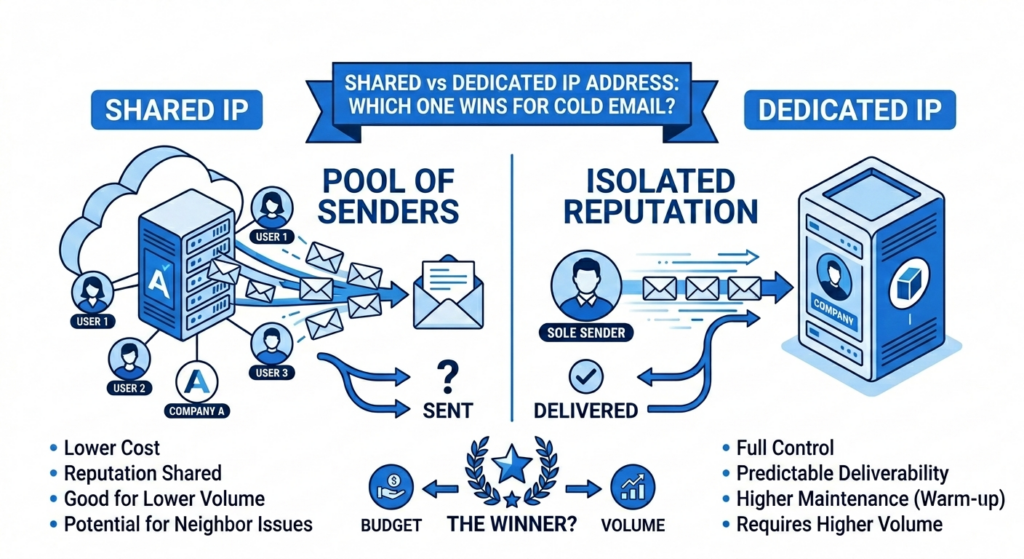
Shared vs Dedicated IP Address for Cold Email: Which One Wins is one of the most important questions businesses face when launching a cold email campaign. One of the biggest decisions is whether to use a shared or dedicated IP address, as this choice directly impacts email deliverability, sender reputation, inbox placement, and overall campaign performance.
A shared IP allows multiple senders to use the same sending reputation, making it a cost-effective option for beginners with lower email volume. In contrast, a dedicated IP gives your business full control over reputation and sending practices, which can significantly improve deliverability for high-volume outreach campaigns. Shared vs Dedicated IP Address for Cold Email: Which One Wins often depends on your sending volume, budget, and long-term outreach goals.
Understanding the pros, cons, and ideal use cases of shared and dedicated IP addresses is essential if you want your cold emails to consistently land in inboxes instead of spam folders. By evaluating Shared vs Dedicated IP Address for Cold Email: Which One Wins, businesses can make smarter decisions and maximize the success of their email campaigns.
What Is Shared vs Dedicated IP Address for Cold Email
In cold email marketing, a shared IP address is an email-sending IP used by multiple businesses or users at the same time, while a dedicated IP address is exclusively assigned to a single sender or company. These IP addresses play a major role in determining your email sender reputation, deliverability rate, and inbox placement. With a shared IP, your email performance can be affected by the behavior of other users sharing the same IP.
On the other hand, a dedicated IP gives you complete control over your sending reputation, making it a preferred choice for businesses sending high-volume cold email campaigns. Choosing between a shared and dedicated IP depends on your email volume, budget, and long-term outreach strategy.
What Is a Shared IP Address?
A shared IP address is an IP address that multiple users share to send their emails. Most email service providers default to shared IPs for their standard plans.
Here is how it works: your emails, along with those from other businesses, are sent through the same IP address managed by the ESP. The IP’s reputation is collectively shaped by all senders using it. If most users follow good practices — sending quality emails to verified contacts — the shared IP can maintain a solid sender reputation.
The risk: if other senders on the same pool engage in spammy behavior, your deliverability takes a hit even if your own practices are clean. That is the defining trade-off with any shared IP address.
When shared IPs make sense:
- Small businesses or startups sending under 50K emails per month
- Teams testing email campaigns before committing to dedicated infrastructure
- Organizations with limited resources who prefer hands-off management
What G2 users say about shared IP performance:
“For our volume — around 20,000 emails per month — the shared infrastructure worked perfectly. Deliverability was solid from day one without any warm-up overhead.” — G2 reviewer, SMB segment
“The shared sending pool meant we could hit the ground running. No ramp period, no DNS headaches. That matters a lot when you’re a team of two.” — G2 reviewer, marketing agency
What Is a Dedicated IP Address?
A dedicated IP address is assigned exclusively to a single sender. Your emails are the only ones sent from that IP, giving you complete control over your IP reputation — and complete responsibility for it.
For cold email marketing agencies sending more than 150,000 emails per month, or e-commerce platforms sending transactional email at scale, dedicated IPs are not optional — they are table stakes. The exclusivity ensures that no other sender’s behavior can undermine your deliverability.
The trade-off: dedicated IPs require a warm-up period of 4 to 8 weeks, ongoing monitoring, and consistent sending volume to maintain a healthy reputation. Buying a dedicated IP without proper management is like acquiring premium sending infrastructure and then burning your domain anyway.
When dedicated IPs make sense:
- Marketing and lead generation agencies sending large volumes of outreach
- Enterprises that need full control over deliverability performance
- SaaS platforms sending mission-critical transactional emails
- Any business where brand protection is non-negotiable
What G2 users say about dedicated IP performance:
“Once we completed the warm-up and got our dedicated IP established, our inbox placement improved dramatically. Worth every penny at our volume.” — G2 reviewer, B2B SaaS
“We moved to a dedicated IP after hitting 200K monthly sends. The improvement in reply rates was immediate and measurable.” — G2 reviewer, outbound agency
“The control over your own reputation is the real value. With a shared IP, you’re always at the mercy of other senders.” — G2 reviewer, demand generation
Real IP vs Shared IP: Breaking Down the Trade-offs
Shared IP Address: The Community Pool
Think of your emails swimming in the same pool as hundreds of other businesses. If everyone follows good practices, the shared pool performs well. If one bad actor spams from the same IP range, every sender on it pays the price.
Benefits:
- Cost-effective: typically included in standard ESP plans, saving $300 to $3,600 annually
- Instant setup: no warm-up period required
- Pre-established reputation: benefit from collective good sending behavior
- Hands-off management: the ESP handles technical maintenance
Drawbacks:
- Reputation vulnerability: poor sending practices from other users on the pool can hurt your deliverability
- Limited control: you cannot isolate deliverability problems to your own practices
- Inconsistent performance: results vary based on the overall quality of the shared pool
Dedicated IP Address: Your Private Sending Infrastructure
With a dedicated IP, every email sent from that address reflects only your sending behavior. That cuts both ways: excellent practices build a strong IP reputation, and sloppy practices degrade it — fast.
Benefits:
- Complete reputation control: your actions alone determine your sender standing
- Enhanced monitoring: access to Gmail Postmaster Tools and Outlook SNDS
- Consistent performance: predictable results based on your sending practices
- Brand credibility: establishes an exclusive sender identity
Drawbacks:
- Higher cost: typically $30 to $100 per month in additional investment
- Warm-up required: 4 to 8 weeks to establish reputation from scratch
- Technical management: requires ongoing monitoring and optimization
- Volume dependency: needs consistent 50K+ monthly sends to stay effective
Email Sending Infrastructure: How It Fits Into Your Stack
How Gmail, Outlook, and Yahoo Treat Shared vs Dedicated IPs
Each major provider evaluates IP reputation differently.
Gmail: Domain Reputation Comes First
Gmail can differentiate individual senders on a shared IP by examining DKIM domain alignment. This means domain reputation often matters more than IP reputation in Gmail’s filtering decisions.
Dedicated IPs still provide better monitoring through Google Postmaster Tools, but even on a shared IP, your domain-level practices drive your Gmail deliverability.
Gmail’s rule: Keep spam complaint rates below 0.3% regardless of IP type. Google and Yahoo both announced in February 2024 that domains hitting 0.3% or higher face automatic delivery problems — a policy that applies to both shared and dedicated IP users.
Outlook: Balanced IP and Domain Signals
Outlook’s filtering assesses both the IP and the sending domain. On a shared IP, poor behavior from other senders in the pool can affect the entire range.
Dedicated IP users gain access to Microsoft’s Smart Network Data Services (SNDS), which provides detailed reputation monitoring including subscriber complaints and spam trap data — visibility that shared IP users simply do not have.
Yahoo: The Most Aggressive IP Filtering
Yahoo employs the strictest approach to IP-level filtering among the major providers. Entire shared IP ranges can be permanently blocked if spam complaint rates exceed 0.3% — no appeals, no second chances.
Dedicated IP users can enroll in Yahoo’s Feedback Loop program for direct spam complaint monitoring and faster remediation.
Choose a Shared IP Address If:
- Email volume is under 50,000 per month
- Budget constraints favor lower infrastructure costs
- You prefer hands-off technical management
- You are testing email marketing before committing to dedicated infrastructure
- Your sending pattern is irregular or seasonal
Practical examples where shared IP is the right call:Local service businesses with under 10,000 subscribers. B2B consultants running targeted outreach to a curated list. Non-profits managing donor communication at modest volume.
Choose a Dedicated IP Address If:
- You send 100,000+ emails per month consistently
- You operate an e-commerce, SaaS, or financial services business with transactional email requirements
- Brand reputation protection is non-negotiable
- You can invest in proper IP management and monitoring
- You need access to provider-specific reputation tools like Gmail Postmaster and Outlook SNDS
Practical examples where dedicated IP is the right call:Marketing agencies sending 500K+ cold emails monthly. E-commerce platforms processing millions of order confirmations. SaaS companies with critical onboarding and lifecycle sequences.
Transitioning Between IP Types
Moving from Shared to Dedicated: The Warm-Up Schedule
Jumping from a shared IP to a dedicated one without warming up is one of the most common deliverability mistakes high-volume senders make. The warm-up process signals to mailbox providers that you are a legitimate, consistent sender — not a sudden burst of unknown traffic.
Standard warm-up timeline:
- Weeks 1–2: 50 to 100 emails daily to your most engaged subscribers
- Weeks 3–4: Scale to 1,000 to 5,000 emails daily
- Weeks 5–6: Increase to 10,000 to 50,000 emails daily
- Week 7+: Deploy full sending volume
During warm-up, prioritize high-engagement campaigns, monitor bounce rates closely (under 2% is the target), use authentication protocols from day one, and track reputation scores weekly.
Smartlead’s automated email warm-up infrastructure handles this ramp in the background, removing the manual overhead from warm-up management entirely.
Moving from Dedicated Back to Shared
Consider this when email volume drops below 50K per month, budget constraints require infrastructure cost reduction, or technical management overhead becomes unsustainable.
Note: switching back means losing reputation control and potentially experiencing temporary deliverability fluctuations as your domain adjusts to the new sending environment.